ANTS: Fourmic Civilization --MMO
A downloadable game
Z Q S D to walk, or click/tap the ground to walk your ant there (press a movement key to take back manual control). Hold Space to zoom in, Shift to zoom out. On mobile, tap where you want to go — hold to dig, gather or cultivate.
Your colony
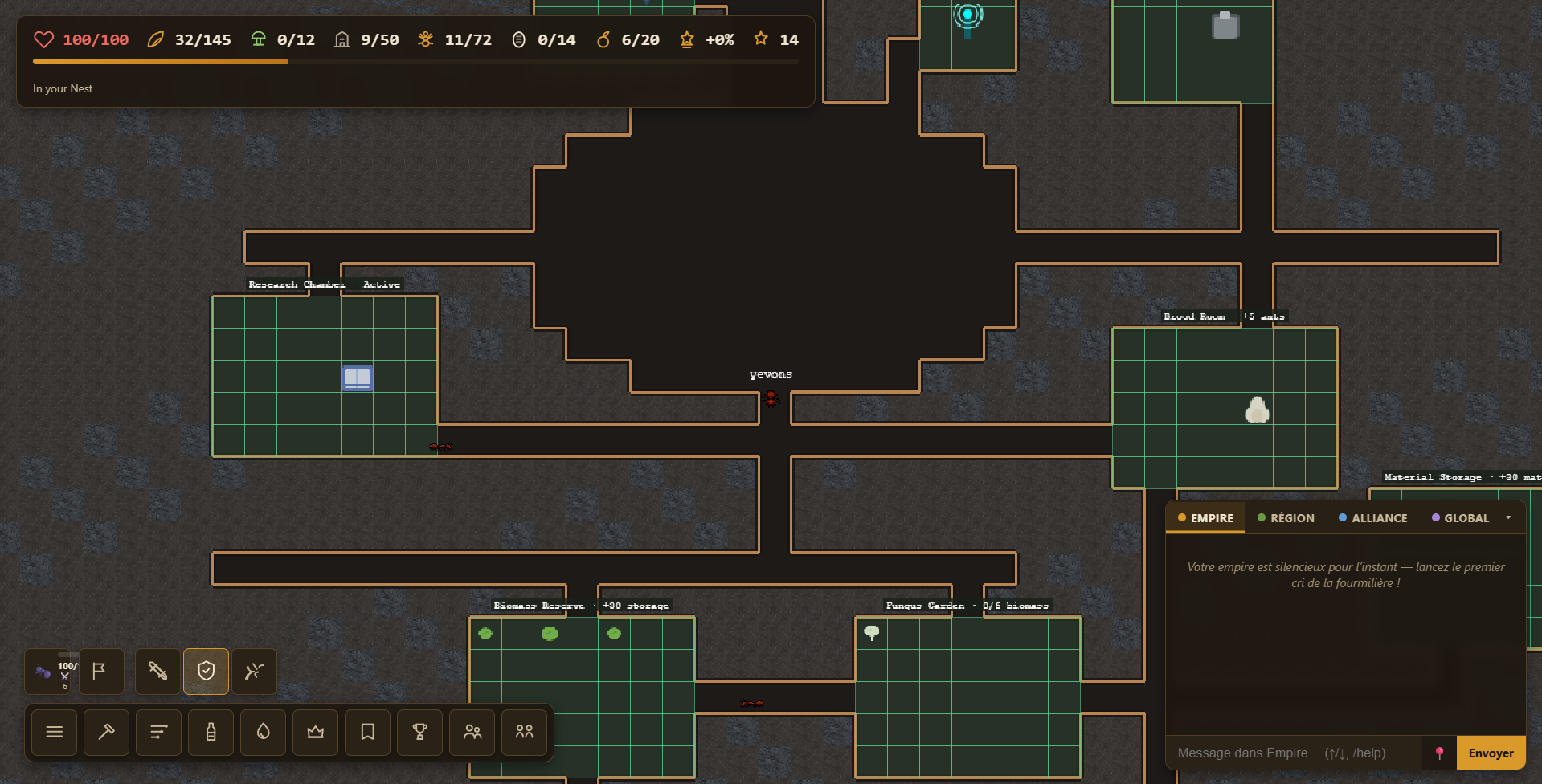
You control a Queen and her workers from inside your Nest. The top-left HUD shows your own health, biomass, fungal food, brood, population and level; health flashes when you take damage. Assign what share of adult workers gather, defend, explore, build, research or nurse from Priorities — the shares always add up to 100%, the ant count per task updates while you drag, and a pending project, an active research, growing brood or a hungry fungus garden each reserve one worker automatically (shown as a « +1 reserved » badge; the Guaranteed Work research reserves two).
Raising the brood
The Queen lays eggs that hatch into larvae, spin a pupa cocoon and finally emerge as adult workers — the whole nursery lives in a Brood Room. Larvae eat constantly: Nurse-task workers carry biomass from the reserve to the nursery to feed them. If the brood larder runs dry they stop growing, so keep a nurse assigned (one is guaranteed automatically while brood exists). The HUD shows how many eggs/larvae/pupae are growing (e.g. 6/14), and each Brood Room raises that nursery capacity so you can raise more at once.
Once you have a Royal Chamber, the nursery can also feed the Queen: when the brood larder is full, nurses bring her biomass too. Each delivery adds +6% egg speed (up to +60%) that fades over time — a crown readout in the HUD shows the current boost. You can help by hand: take biomass from the reserve, carry it to the Royal Chamber and click to feed her yourself. Keep a healthy share of nurses to keep her laying fast.
Gathering
Walk up to a leaf out in the World and hold click to gather biomass. Workers on the gather task do this automatically. Biomass furnishes rooms and feeds production; it is a raw input, not a score.
Shaping the nest
Open Plan inside the Nest. Drag a narrow Tunnel from an existing dark gallery, then place a multi-tile room against that network. Build workers excavate reachable rock first and then carry materials to furnish the room. Building materials come from two sources: rubble from every excavated tile, and stones, pebbles and twigs foraged on the surface — gatherers bring them to the Material Storage. Stand beside the active front and hold click—or hold your finger on mobile—to help them dig. Once excavation is complete, you can also take one furnishing material from the reserve and carry it to the room yourself. A Biomass Reserve adds 30 storage; a Brood Room adds capacity for 5 ants. At colony level 3, one protected Royal Chamber can shelter the Queen, make egg laying 30% faster, and let the nursery feed her for an extra stacking boost. Ordinary movement never digs through rock.
Removing rooms
To remove an unfinished project, use Cancel on one of its highlighted tiles — delivered materials are returned. To remove a finished room, use Destroy and click any tile of it: its function is removed and half the invested material is refunded (the excavated space stays open). Tunnels themselves cannot be destroyed.
Sealing
To refill an excavated area (a demolished room or a dead-end gallery) back into solid rock, select Seal and drag a rectangle over it. Build workers carry biomass to the seal front; each tile costs 0.5 biomass. The space is filled when the project completes, and you cannot seal an area that would cut off another part of the nest. Seal projects are cancelled like any other unfinished job.
Research
Build a Research Chamber (colony level 2, after a Brood Room) and open Research from the action bar. Each study costs biomass — and sometimes fungal food — and needs a colony level plus an active room of a given type. The tree has five tabs: Foundations (harvest, brood, storage, fungus, digging, hygiene), Attack, Defense, Utility (speed, energy, pheromones, queen, workforce, exploration) and Hero (your own ant). A worker assigned to Research works inside the chamber until the study is complete, then the bonus applies forever. Many nodes list prerequisites — research them first. Bump the Research slider in Priorities to speed it up; while a research is active, at least one worker always studies.
Fungiculture
A Fungus Garden begins the fungiculture path and requires an active Biomass Reserve. Idle Build workers carry biomass into it and cultivate each batch: 3 biomass becomes 1 fungal food after 6 seconds of work. Each garden stores up to 12 fungal food. The Queen consumes one when starting a brood cycle to make that egg develop 35% faster. Near the reserve or garden, click/touch the contextual prompt to carry substrate or hold to cultivate it yourself.
Reading the ground
Unexcavated rock is textured and opaque, finished galleries are nearly black with a clear earthen wall, and planned work is shown as a gold grid. Project labels show whether workers are excavating or furnishing it.
Threats
Wild predators roam the World. If one gets close, hold click to fight it off - or let your defend-task workers respond automatically once they pick up the scent.
Pheromones
Open the Pheromone menu to drop resource, guard or alert scent markers - your ants read these to decide where to head.
Meeting other players
The World is shared: out in a region you will meet ants from other colonies, and new colonies settle close together around the center of the map. Right-click a nearby player on desktop (or hold your finger on mobile) to send a friend request, start a private message, or drop a compass toward them. The Friends panel (action bar) lets you add a player by name, accept requests, and — for each friend — Follow to keep a live compass arrow pointing at them while they play.
The chat (bottom-right) has one channel per group: Empire (your colony), Région (the world region you are in), Alliance and Global. Press Enter to start typing and Esc to stop; ↑/↓ recall the messages you sent. A few commands: /pos shares your position, /w <joueur> message whispers, /r message replies to your latest private message, /me action acts, and /help lists them all. Click an author to open a private conversation, or its @ to mention them. The Empire channel pins your colony's Message of the Day at the top (its owner or an officer sets it from the Empire window), and announcements posted there appear as highlighted cards — click an announcement's author to reply privately.
Use the 📍 button (or /pos) in the chat to share your current position in any channel (or a private message); anyone who clicks the link can drop a compass toward that spot. The arrow stack at the top-right of the screen shows every active compass pointer — click ✕ to drop one. Pheromones guide your ants; the compass guides you to your friends.
Soldiers & rally
Research Warrior Caste (colony level 4, Royal Chamber) to unlock soldiers, then click the active Royal Chamber to have the Queen lay soldier eggs instead of workers — each soldier egg costs extra biomass. Soldiers are sturdier, hit far harder, and answer a rally call first.
Rally (out in the World) makes up to your cap of nearby ants follow and fight alongside you; click again to release them. The cap grows with the army you build: +1 slot per Guard Post level, plus more from Warrior Caste and the Mobilization research.
Combat stance
Your stance decides what you and your rallied squad may attack. Pick it with the three small buttons in the action bar (Hostile / Defend / Passive):
- Hostile — attack everything in range: predators and nest raids, but also other players and their ants. PvP is on.
- Defensive (default) — attack predators and nest raids, never other players or their ants.
- Passive — never attack on your own; your squad just follows you. You can switch back at any time.
The server enforces it: a Defensive or Passive player cannot hurt another colony, so you can walk through a stranger's nest without a stray click starting a fight. Your rallied squad follows the same stance.
Your ant's stats
The 🐜 slot at the left of the bottom bar is your own player sheet: a live health bar with your current/max HP, plus your attack and defense at a glance. Click it to open the full stats panel — max health (boosted by Guard Posts and research), damage, defense, regeneration, movement speed, attack cadence, critical strikes, armor-piercing and every situational bonus your colony's research grants you. Each stat chip explains where its bonus comes from on hover. The numbers come from the same server summary as the Empire window's overview, so the two displays always agree. HP updates live as you fight; the panel refreshes automatically whenever you complete a research.
Nest defense & raids
Your nest is not just a home, it is a fortress. Hostile larvae lurk in unearthed caverns and rotten corpses, and from time to time a raid forces its way in through the entrance tunnel and pushes toward the queen. When a raid starts you will see a warning — defend the door!
Raids size themselves to your colony: the more grown workers you have, the bigger the invading pack — and the tougher your workers' stats, the tougher the invaders (the warning tells you the raid's invasion level). A young colony faces a young threat; a veteran, well-researched colony faces a veteran one. So a raid is always something you can fight back against, never a wall you are not ready for.
When a raid breaks in, your whole colony answers the alarm: every worker inside the nest drops what it is doing and rushes the marauders, so production pauses while the door is under threat. The Defend priority in Task Priorities keeps workers guarding between attacks — they hold the entrance (or your nearest Guard Post). Every Guard Post level raises the damage your whole colony deals, and you can always fight the marauders yourself next to them. Because raiders only follow your dug corridors, how you carve the nest — a narrow tunnel, a Guard Post at a choke point — truly shapes how deep an attack can go. Repel a raid for a biomass reward; raids return every fifteen minutes or so while you are home, so build up your Guard Posts to make each one easier.
Ant info
Right-click any ant on desktop, or tap it on mobile, to see its role, health, energy, age and current task. Right-click also cancels a planning tool; the browser menu is disabled over the game surface.
Leave a comment
Log in with itch.io to leave a comment.